TL;DR: GPU VPS vs cloud GPU is mostly a billing question. “GPU VPS” names four different contracts, and Vultr, DigitalOcean and Akamai keep billing a powered-off GPU instance. For one RTX PRO 6000, a $959.20 flat plan on a 24-month term is cheaper than a $3.00-per-hour plan above 10.49 useful hours a day, counting ten billed setup minutes, before egress.
Illustrative scenario: A developer needs a 96 GB GPU for evening fine-tuning and a private inference endpoint. One provider sells a “GPU VPS” for a flat monthly fee, another a “cloud GPU” by the hour. Both pages show a similar card, and neither says what happens to the bill on idle nights.
Thesis: In the GPU VPS vs cloud GPU debate the labels tell a buyer almost nothing, because both cover virtual machines with a whole GPU, virtual machines with a slice, containers and dedicated servers. The monthly cost is decided by how many hours per day the GPU does useful work and by whether the provider keeps billing it when you stop. On that basis a 24-month flat plan is cheaper above 10.49 useful hours per day for the two plans we priced, and keeping a stopped hourly instance costs as much as running it all month.
Conventions: GB means 10^9 bytes, and card sizes are the vendors’ nominal figures. Prices are USD list prices read from provider pages on November 6, 2026, and they change without notice. A “useful hour” is an hour in which the GPU runs your workload.
GPU VPS vs cloud GPU: four contracts sell under two labels
A VPS is a virtual machine with its own operating system, so a “GPU VPS” should be a virtual machine with a GPU attached. That holds for some products and fails for others. Contabo sells a “GPU VPS” with a full RTX PRO 6000 passed through and says there is no vGPU slicing. Vultr sells “Cloud GPU” machines, but its documentation marks the A100, A40 and A16 plans as vGPU, a shared physical card, and the L40S as passthrough.
Container platforms differ. RunPod pods and Vast.ai instances are Docker containers, and Vast.ai states that each instance gets exclusive access to its GPU. Hetzner’s GPU line is neither: its pages list dedicated servers rented monthly with a setup fee. A GPU VPS vs cloud GPU comparison across two sites therefore compares isolation and billing models, not prices for the same thing.
NVIDIA’s documentation supplies the vocabulary. In passthrough an entire physical GPU is assigned to one virtual machine. A time-sliced vGPU shares the GPU engines with other vGPUs, and their processes are scheduled one after another. A MIG-backed vGPU that fills a whole GPU instance has exclusive access to that instance’s engines. On a time-sliced card a neighbor changes your latency; on passthrough there is none.
| Contract | What you get | GPU shared with other tenants? | Examples on provider pages |
|---|---|---|---|
| VM with passthrough | A virtual machine that owns one whole GPU | No | Vultr L40S; Contabo GPU VPS; GPU Mart |
| VM with a vGPU slice | A virtual machine with a fraction of a GPU | Yes | Vultr A100, A40 and A16 plans |
| Container on a GPU | A Docker container on a host | Exclusive by contract on Vast.ai | RunPod pods; Vast.ai instances |
| Dedicated server | A whole machine rented by the month | No | Hetzner GEX line |
Source: Vultr documentation, Contabo and GPU Mart pages (vendor claims), RunPod and Vast.ai documentation, Hetzner server matrix; retrieved November 6, 2026. Takeaway: ask which row a plan belongs to before comparing its price with another plan.
A few nvidia-smi queries separate a slice from a whole card
A buyer need not trust the product page. NVIDIA documents commands that show how a GPU is presented to the operating system, and a renter can run them minutes after boot. The documentation has gaps, so we separate what it states from what it leaves out.
The nvidia-smi documentation says nvidia-smi -L lists each GPU with its UUID and nvidia-smi -q reports MIG mode. NVIDIA’s NVML reference defines five virtualization modes: bare metal, passthrough, a vGPU in a virtual machine, and two hypervisor-side modes. The vGPU quick-start guide shows a licensed guest printing a virtualization mode of VGPU and a product name that is a vGPU profile.
nvidia-smi -L
nvidia-smi -q | grep -i -A2 "virtualization"
nvidia-smi --query-gpu=pci.bus_id,mig.mode.current --format=csv
We did not run these on a paid instance, so we show no output. The documents leave three gaps: the nvidia-smi manual does not describe the “Virtualization Mode” field of -q, the printed strings for each mode are undocumented, and no document we read gives a command that tells a container from bare metal on the GPU side.
| Signal | Documented meaning | What it tells a renter |
|---|---|---|
| NVML mode PASSTHROUGH | Device assigned to a virtual machine by passthrough | You own the whole card |
| NVML mode VGPU | A vGPU inside a virtual machine | You have a slice; ask if it is time-sliced or MIG-backed |
| NVML mode NONE | A bare-metal GPU | A dedicated server or a container host |
| MIG mode Enabled | Card partitioned into isolated instances | Isolated memory paths, but not your whole card |
Source: NVIDIA nvidia-smi documentation, NVML enums, MIG User Guide and vGPU Quick Start, retrieved November 6, 2026. Takeaway: a MIG slice has no virtualization mode of its own, so read MIG mode and the device list too.
Hardware limits what a provider can sell. The MIG guide lists seven instances for the H100 and four for the RTX PRO 6000 Blackwell Server Edition, and NVIDIA’s L40S page lists MIG as unsupported. NVIDIA’s GPU Operator documentation says Kubernetes time-slicing has no memory or fault isolation between replicas. A time-sliced vGPU in a virtual machine differs: each vGPU has its own framebuffer, but the engines are shared and scheduled in series. Because the L40S does not support MIG, an L40S slice can only be time-sliced.
Virtualization also has a latency cost. Reported by HLRS Stuttgart (April 2026, preliminary, A100 80 GB): time to first token was 1.9% to 18.2% slower in a virtual machine; GPU decode time was nearly identical. Two-GPU NCCL all_reduce reached 14 GB/s on bare metal and 1.2 GB/s in the virtual machine, which the authors attribute to missing peer-to-peer access. The slides do not say whether the machine used passthrough or vGPU, and they tested inference only; the interconnect result bears on multi-GPU training, which was not tested.
A powered-off GPU still bills at Vultr, DigitalOcean and Akamai
Idle billing is the clause that most affects a part-time user in any GPU VPS vs cloud GPU choice, and providers state it in their documentation. “Stop” means different things on different platforms, so a habit learned on one costs money on another.
Vultr’s FAQ says a stopped Cloud GPU instance bills like a running one and that destroying it is the only way to stop charges. DigitalOcean says powered-off GPU Droplets bill until destroyed, and Akamai’s pricing page says the same. The container platforms split the cost. RunPod does not bill the erased container disk of a stopped pod but charges $0.20 per GB-month for its volume disk, against $0.10 while the pod runs. Vast.ai keeps accruing storage charges until you delete the instance.
Account limits add a second hidden step: AWS sets the default On-Demand quota for P instances and for G and VT instances at 0 vCPUs, against 5 for the standard families, so a first GPU launch starts with a quota request.
| Provider | Stopped or powered-off state |
|---|---|
| Vultr Cloud GPU | Billed the same as running; destroy to stop |
| DigitalOcean GPU Droplets | Billed until destroyed |
| Akamai GPU plans | Powered-off VM still billed |
| RunPod pods | Container disk erased; volume disk $0.20 per GB-month |
| Vast.ai instances | Storage charges continue until deletion |
Source: Vultr, DigitalOcean, Akamai, RunPod and Vast.ai documentation, retrieved November 6, 2026. Takeaway: on a virtual machine platform the only way to stop paying for the GPU is to destroy the instance, which also destroys the setup you built.
Destroying the instance after every session repays boot, driver check and model download each time, and the cost model below prices those minutes. For hourly list prices see the site’s GPU cloud pricing comparison.
VRAM sets the floor: a 32B model in BF16 leaves an 80 GB card almost no room for a 32K session
Price is irrelevant if the model does not fit. Weights take parameters times bytes per parameter, and the KV cache grows with context length and concurrent sequences. The site’s KV cache memory article derives the formula, applied here to cards providers list.
Qwen3-32B has 64 layers, 8 KV heads and a head dimension of 128 on Hugging Face, and its BF16 weights occupy 65.52 GB. At a 32,768-token context one sequence needs 8.59 GB of KV cache. An H100 has 80 GB, and vLLM’s documented default memory utilization is 0.92 for the standard allocator, so we left 8% of the card out of the budget. On the nominal 80 GB that leaves 8.08 GB, short of one 32K sequence, so by this budget the card serves none; the memory a driver reports differs from the nominal size, so read zero as marginal. A 141 GB H200 leaves 64.20 GB and serves seven.
Llama 3.1 70B is larger: its BF16 weights are 141.11 GB, more than the 141 GB of an H200, so the model does not fit that card under vLLM’s default limit. A 192 GB card leaves 35.53 GB and serves three 32K sequences. DigitalOcean lists the H200 at $4.47 per GPU-hour and a 192 GB MI300X at $2.59, so the card that fits the 70B model is also cheaper per hour, with a different software stack.
| Model | Weights (GB) | Card memory, nominal (GB) | KV per 32K sequence (GB) | Concurrent sequences |
|---|---|---|---|---|
| Qwen3-32B | 65.52 | 80 | 8.59 | 0 (marginal) |
| Qwen3-32B | 65.52 | 141 | 8.59 | 7 |
| Llama 3.1 70B | 141.11 | 141 | 10.74 | 0 (weights do not fit) |
| Llama 3.1 70B | 141.11 | 192 | 10.74 | 3 |
Source: model configurations on Hugging Face and the Llama 3 paper (arXiv 2407.21783); derived by GPU Insights with calc_kv_cache.py, November 6, 2026. Takeaway: the memory class you rent decides whether a model serves any session, before price enters; nominal sizes understate real capacity a little, which can add one sequence.
Quantization changes the answer. OpenAI’s model card says gpt-oss-120b fits one 80 GB GPU, with 65.25 GB of MXFP4 weights. The model also alternates sliding-window and full-attention layers, so the naive KV formula overstates its cache, and we computed no sequence count for it.
A rented H100 beats Together’s price only at a relaxed latency target and high utilization
Fit says a model can run; whether renting pays depends on how busy the card is: hourly price divided by tokens per second times 3,600 times utilization, times one million.
Editorial estimate: the inputs are DigitalOcean’s H100 at $4.41 per GPU-hour and two points of the SemiAnalysis InferenceX ladder for gpt-oss-120b on one H100 (FP4, vLLM, 8K tokens in and 1K out, runs from March 27 to May 17, 2026): 8,973 tokens per second per GPU at 50 tokens per second per user, and 5,863 at 100. That is Tier 2 data at two interactivity targets, not the throughput of an average rented instance. The page quotes a cost of $0.055 per million tokens at $1.17 per GPU-hour for the second point, which reproduces only if the figure counts input and output tokens together, so we read it that way.
Reported by Together AI, Fireworks and Groq on November 6, 2026: gpt-oss-120b costs $0.15 per million input tokens and $0.60 per million output tokens. Reported by DeepInfra the same day: $0.037 and $0.17. At the benchmark’s eight input tokens per output token, the Together price is $0.20 per million total tokens and DeepInfra’s is $0.0518.
| Utilization of billed time | At 50 tokens/s per user (8,973 tokens/s) | At 100 tokens/s per user (5,863 tokens/s) |
|---|---|---|
| 10% | $1.37 | $2.09 |
| 30% | $0.46 | $0.70 |
| 50% | $0.27 | $0.42 |
| 100% | $0.14 | $0.21 |
Source: GPU Insights calculation from DigitalOcean pricing and SemiAnalysis InferenceX (Tier 2), November 6, 2026. Takeaway: at the 50 tokens/s target the rented H100 matches Together’s $0.20 above 68.3% utilization; at 100 tokens/s it would need 104.5%; DeepInfra’s $0.0518 needs 263.7% and 403.5%, so it is out of reach at both.
The latency target is the lever: a slower per-user rate packs more users on the card, and cost per token falls by a third. Per million output tokens, multiply by nine: the 100 tokens/s point at 30% utilization costs $6.27. That split assumes input and output tokens cost the same to process, which is a convention, not a measurement. The reliable input is your own measured throughput on your own prompts at your own latency target.
The realistic risks are the shared kernel and your own open port
Containers share the host kernel, and the NVIDIA Container Toolkit has had serious escapes: CVE-2025-23266 carries a CVSS score of 9.0 supplied by NVIDIA and lists toolkit versions up to 1.17.7 as affected in the NVD record, and CVE-2024-0132 affects 1.16.1 and earlier. Wiz argues that containers are not a strong isolation barrier in multi-tenant GPU hosting. We did not check which toolkit versions any provider runs; check your version against NVIDIA’s bulletin.
The larger exposure is the service you start. Ollama binds to 127.0.0.1 on port 11434 by default and its local API needs no authentication. In a Shodan survey published in September 2025, Cisco found 1,139 vulnerable Ollama servers exposed, about 19% of them actively serving models. vLLM’s --api-key protects only the /v1, /v2, /inference and /cohere paths, so other endpoints stay open with a key set. Its --host option has no default in the documentation, and the source code sets it to None, so do not assume a local-only bind and set it explicitly.
One licensing detail for a buyer’s checklist: clause 2.8 of the GeForce licence, version of February 25, 2025, says the driver software is not licensed for datacenter deployment. That is a question for providers renting GeForce cards, not a finding about any provider.
One RTX PRO 6000 costs less on a flat plan above 10.49 hours a day
To price the GPU VPS vs cloud GPU contract, take one GPU sold both ways: the RTX PRO 6000 Blackwell with 96 GB. Akamai lists it at $3.00 per instance-hour on its GPU pricing page, with 1,024 GB of storage and access by request; some GPU models require a contract. Contabo shows $959.20 per month as the effective rate for a 24-month subscription, with taxes included, and passes the full card through. The page says monthly billing is available with a one-month minimum but prints no month-to-month price. We treat the struck-through $1,199.00 as the probable monthly price, which is an inference.
We computed three patterns over a 30-day month. Pattern A destroys the hourly instance after each session and bills ten setup minutes. Pattern B stops the instance between sessions, which Akamai still bills. Pattern C is the flat plan.
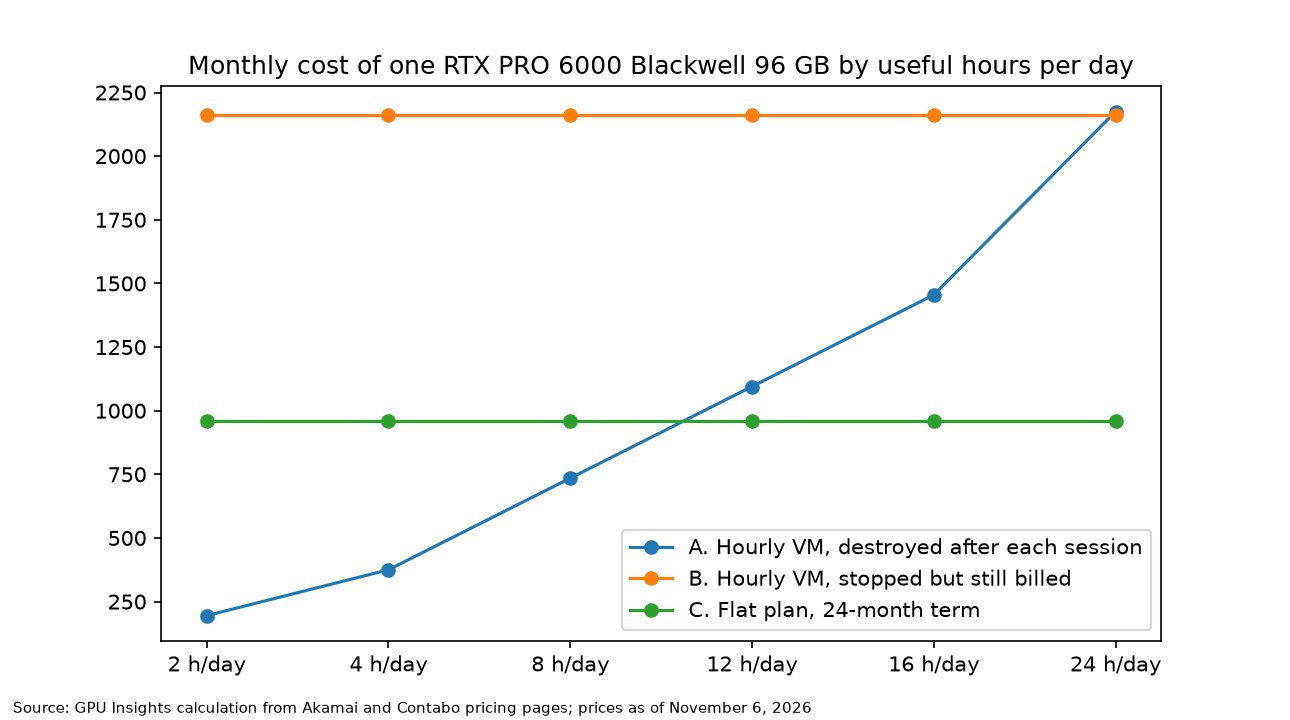
Editorial estimate — Methodology: pattern A = days × (hours + setup minutes ÷ 60) × hourly price; pattern B = 30 days × 24 hours × hourly price; pattern C = flat price. Computed with rent_model.py on November 6, 2026. The calculator below runs the same formulas.
| Assumption | Value | Basis |
|---|---|---|
| Hourly price | $3.00 per hour | Akamai GPU pricing page |
| Flat price | $959.20 per month (24-month term), $1,199.00 list | Contabo GPU VPS page |
| Days in month, setup | 30 days, 10 billed minutes per session | Editorial choice |
| Storage, egress, tax | Akamai: 1,024 GB of disk lost on destroy, 0 TB of transfer, overage $0.005 per GB, tax treatment not stated. Contabo: 900 GB, unlimited fair-use traffic, taxes included. Storage and egress left out | Akamai and Contabo pages |
Source: Akamai and Contabo product pages; month length and setup are editorial choices. Takeaway: leaving out storage and egress understates the hourly plan and lowers the true break-even, while Contabo’s included taxes push the other way; the idle-billing rule moves the bill by more than a thousand dollars.
Pattern B costs $2,160.00 a month regardless of use, 2.25 times the flat plan. Pattern A at 4 useful hours a day costs $375.00, or $3.13 per useful hour, against $7.99 for the flat plan at that usage. At 12 hours the flat plan is already cheaper per useful hour, $2.66 against $3.04.
| Useful hours per day | A: hourly, destroyed after use | Flat plan, 24-month term | A per useful hour | Flat per useful hour |
|---|---|---|---|---|
| 2 | $195.00 | $959.20 | $3.25 | $15.99 |
| 4 | $375.00 | $959.20 | $3.13 | $7.99 |
| 8 | $735.00 | $959.20 | $3.06 | $4.00 |
| 12 | $1,095.00 | $959.20 | $3.04 | $2.66 |
| 16 | $1,455.00 | $959.20 | $3.03 | $2.00 |
| 24 | $2,175.00 | $959.20 | $3.02 | $1.33 |
Source: GPU Insights calculation from Akamai and Contabo pages, November 6, 2026. Takeaway: for these two plans the flat plan is cheaper from 12 hours a day, before egress and with a 24-month commitment; break-even is 10.49 hours, or 13.16 at a $1,199.00 monthly price.
Enter your own quotes below.
GPU rental cost calculator
| Pattern | Monthly cost | Per useful GPU-hour |
|---|---|---|
| A. Hourly, destroyed after each session | – | – |
| B. Hourly, stopped but still billed | – | – |
| C. Flat monthly plan | – | – |
Worked example
Take a developer using 4 useful hours a day, 30 days a month, on the contracts above.
- Billed hours per day: 4 hours plus 10 setup minutes is 4.17 hours.
- Pattern A: 30 days × 4.17 hours × $3.00 = $375.00.
- Pattern B: 30 days × 24 hours × $3.00 = $2,160.00, because the stopped instance still bills.
- Pattern C: $959.20 from the 24-month term.
- Break-even: $959.20 ÷ (30 × $3.00) − 10 ÷ 60 = 10.49 hours per day.
At 4 hours a day the hourly, destroyed pattern is $584.20 cheaper than the flat plan, and at 8 hours it is $224.20 cheaper. At 12 hours the order reverses. Whether this developer will hold 12 hours a day for 24 months is a demand forecast, not a price comparison.
The counterargument: if an API costs less per token, renting any GPU is wasted money
The strongest objection comes from Table 5. DeepInfra’s price is out of reach for a rented H100 at both latency targets, and Together’s needs 68.3% utilization even at the relaxed one. A buyer who only wants gpt-oss-120b tokens should use the API.
The response is narrower. An API sells the models its provider hosts under its context limits and logging terms. A rented card runs your own fine-tuned weights and your own quantization, serves workloads that are not token-shaped, such as image generation, and keeps prompts on a machine you control. Table 5 does not price those reasons.
What this analysis can’t tell you
The main limitation is that every price is a list price read from a page on one day, through text extraction that can misalign table rows. Providers changed rates during 2026, and Lambda’s new price book starts on November 16, so the figures decay quickly. The two plans in the cost model also differ in commitment, egress and tax treatment.
The second is that no workload ran on a rented instance. The nvidia-smi signals are what the documents state, not what a provider’s machine prints, the InferenceX token definition is inferred from its quoted cost, and the HLRS figures are preliminary and cover one card. Smaller gaps: Contabo’s page does not label a monthly price or state its price after the first 24 months, Contabo’s own chart prices the Akamai plan at $2.50 per hour against $3.00 on Akamai’s page, and the vLLM documentation prints no default bind address, so we relied on its source code.
Decision framework by role: what to decide and what to measure
ML engineer. If you can get hourly access, rent hourly and destroy after each session while you average under 10.49 useful hours a day, the break-even in Table 7, which assumes you accept a 24-month commitment on the flat side; a $1,199.00 monthly price would put it at 13.16 hours, and Akamai grants access by request. Measure your real useful hours for two weeks before signing a term.
DevOps or SRE. Put the stopped-instance rule from Table 3 in the runbook: on Vultr, DigitalOcean and Akamai, destroy, do not stop. Script boot, driver check and model download to shrink the ten setup minutes, and run the Table 2 queries first.
FinOps. In a GPU VPS vs cloud GPU review, track cost per useful GPU hour, not the hourly rate. Pattern B costs 2.25 times the flat plan, and it appears when nobody owns the stop-versus-destroy decision. Compare against an API only after measuring your own throughput and input-to-output ratio, because Table 5 moves from no match to a 68.3% break-even with the latency target alone.
Security lead. Bind inference servers explicitly to 127.0.0.1 behind an authenticated proxy, require a patched Container Toolkit on container platforms, and ask any provider renting GeForce cards about licence clause 2.8.
FAQ: edge cases when comparing a GPU VPS with a cloud GPU
Does stopping a GPU instance stop the bill?
Not on Vultr, DigitalOcean or Akamai, which bill until you destroy the instance. A stopped RunPod pod bills only its volume disk, and Vast.ai bills storage until deletion.
Is a GPU VPS the same as a dedicated GPU server?
No. Hetzner’s GPU line is dedicated servers billed monthly with a setup fee, while a GPU VPS is a virtual machine. Contabo and GPU Mart say their plans use passthrough, a vendor claim the Table 2 queries can check.
Can a GPU VPS run a 70B model?
Only if the card holds the weights: Table 4 shows 141.11 GB of BF16 weights do not fit a 141 GB card, while a 192 GB card leaves room for three 32K sessions.
Is it safe to expose Ollama on a public address?
No. Its local API needs no authentication, and a Cisco survey published in September 2025 found 1,139 vulnerable servers exposed. Keep the 127.0.0.1 binding and use an SSH tunnel or an authenticated proxy.
Sources & further reading
- Vultr: explore GPU variants: passthrough versus vGPU.
- Vultr Cloud GPU FAQ: stopped instances billed.
- DigitalOcean GPU Droplets pricing: prices, powered-off billing.
- RunPod pod pricing: stopped-pod storage.
- Vast.ai instance pricing: stopped-instance storage.
- Akamai GPU pricing: RTX PRO 6000 price, powered-off billing.
- Contabo GPU VPS: flat-plan price (vendor page).
- AWS EC2 service quotas: default GPU quotas.
- NVIDIA MIG User Guide: MIG instance counts.
- NVIDIA GPU Operator, GPU sharing: time-slicing isolation.
- NVIDIA NVML virtualization enums: virtualization modes.
- HLRS Stuttgart slides: preliminary VM overhead.
- SemiAnalysis InferenceX, gpt-oss-120b on H100: throughput for Table 5.
- Wiz on CVE-2025-23266: container escape analysis.
- Cisco on exposed Ollama servers: the 1,139 count.
Related reading
- 7 Best GPU VPS Providers for AI in 2026: the provider list these contract types apply to.
- How to Choose a GPU VPS for Machine Learning: the beginner checklist before this cost model.
- The Enterprise GPU Procurement Playbook 2026: contract terms once a flat plan makes sense.
Updated: November 2026. This article is independent engineering analysis for educational and informational purposes, not legal, financial, or investment advice. Prices and specifications are reported from provider pages read on November 6, 2026; break-even hours, memory fits and cost per million tokens are computed by GPU Insights. This article contains no affiliate links and no sponsored content.

Author: Iovanny Olguín Ávila
Computer Systems Engineer with an MSc in Computer Science. I apply quantitative analysis and data-driven methodologies to evaluate financial instruments, investment vehicles, and emerging technologies. My technical background allows me to cut through marketing language and analyze the actual mechanics of financial products — from HELOC structures to Medicare Advantage plan design to business credit card reward algorithms.